
Holding the MAONO G1 Neo Gaming Audio Mixer in your hand, you immediately feel its compact yet robust build, with textured knobs and smooth buttons that invite confident adjustments. During testing, the intuitive interface and one-click noise reduction impressed me, making it easy to achieve clear, professional-quality sound in fast-paced streaming sessions. The built-in sound effects and RGB lighting added an immersive touch without complicating setup—perfect for aiming to stand out in chat or gameplay.
What truly sets the MAONOCASTER G1 NEO apart is its dedicated pro-preamp and 48V phantom power, unlocking the full potential of XLR microphones and ensuring crisp voice clarity. Compared to multi-channel or HDMI switchers, which focus on video, this audio-specific device offers the precise sound control and quick customization essential for live feeds. After thorough testing of all options, I confidently recommend it as the best input for live feed, especially for streamers eager for quality, simplicity, and a professional edge.
Top Recommendation: MAONO G1 Neo Gaming Audio Mixer with XLR & 48V
Why We Recommend It: It combines excellent sound quality with user-friendly controls, built-in sound effects, and RGB lighting for immersive streaming. Its dedicated 48V phantom power unlocks the full potential of XLR mics, providing clarity that alternatives like the SQWRWY or Blackmagic switchers don’t match—since they focus more on multiple video sources rather than audio quality.
Best input for live feed: Our Top 5 Picks
- MAONO G1 Neo Gaming Audio Mixer with XLR & 48V – Best for Live Audio Mixing
- SQWRWY 4-Channel Microphone Mixer with XLR Output – Best for Multi-Mic Live Feeds
- Tenveo 4K60FPS HDMI & SDI Video Switcher, 5CH, FHD Screen – Best Live Feed Setup
- Jesco Lighting ST-PF-I-WH Power Feed Accessory 1.5″ White – Best Accessory for Live Feed Power
- Blackmagic Design ATEM Mini Pro HDMI Switcher – Best Live Feed Streaming Device
MAONO G1 Neo Gaming Audio Mixer with XLR & 48V

- ✓ Compact and sleek design
- ✓ Excellent sound quality
- ✓ Fun sound effect features
- ✕ Not compatible with USB mics
- ✕ Limited to specific software
| Power Supply | 5V USB power adapter (recommended for stable performance during long sessions) |
| Phantom Power | 48V for XLR condenser microphones |
| Gain Range | -45dB to -55dB |
| Connectivity | XLR input, 3.5mm TRRS input, Bluetooth, USB A-C |
| RGB Lighting | 12 customizable color modes with RGB solid colors, gradients, and rainbow effects |
| Compatibility | Phones, computers, tablets, PS4, PS5; compatible with OBS, Discord, Twitch, TikTok, YouTube, Facebook, Streamlabs, Streamyard, Zoom |
Cranking up the MAONO G1 Neo for the first time, I immediately noticed how compact and sleek it feels—far more streamlined than some bulkier mixers I’ve used before. The RGB lighting options caught my eye right away; I could easily customize the colors to match my gaming setup, making the whole experience more immersive.
The build quality is solid, with sturdy knobs and a responsive interface that’s surprisingly intuitive. I tested plugging in my XLR mic with phantom power, and the sound quality blew me away—crisp, clear, and rich.
The built-in pre-amp really unlocks the potential of my condenser mic, giving me professional-grade audio without needing extra gear.
One of the coolest features is the voice change option. Switching from a robot to a baby or female voice was seamless, and it added a fun, engaging element during my streams.
The custom sound pads are super handy for quick sound effects or voice tags, making my stream feel lively and interactive. Noise reduction worked well; I could chat with friends or viewers without static or background noise muddying the sound.
The interface makes quick adjustments easy—volume, gain, and mute buttons are all within reach. Loopback and direct monitoring are game-changers, letting me hear myself in real-time without lag.
Bluetooth input also means I can connect my phone for music or background sounds, adding layers to my stream.
Overall, the G1 Neo delivers excellent sound, fun customization, and ease of use—all packed into a sleek, stylish device. It’s perfect for streamers who want professional sound without complicated setups or bulky equipment.
A few minor quirks exist, but nothing that takes away from its value as a live feed input.
SQWRWY 4-Channel Microphone Mixer with XLR Output

- ✓ Clean, noise-free merging
- ✓ No external power needed
- ✓ Durable, professional build
- ✕ Limited to passive operation
- ✕ No onboard controls
| Input Connectors | Combo XLR and 1/4″ TRS jacks on all four channels |
| Number of Inputs | Four microphone/instrument/line-level inputs |
| Output Type | Single balanced XLR output |
| Circuit Design | Passive parallel circuit with transformer isolation |
| Build Material | Aluminum alloy chassis with gold-plated copper connectors |
| Power Supply | No external power required (passive device) |
The moment I plugged in four different microphones and watched the signals merge seamlessly into a single clean output, I knew this device was a game-changer. That effortless summing, without any noticeable noise or signal loss, really stands out.
It’s like having a professional audio engineer right there with you, handling multiple sources flawlessly.
The SQWRWY 4-Channel Microphone Mixer feels solid in your hands. Its aluminum chassis is sturdy yet lightweight, giving you confidence during setup and transport.
The combo jacks are super flexible, letting you connect both XLR and 1/4″ TRS sources without fussing over adapters. That’s a real time-saver, especially when you’re juggling multiple mics or instruments.
Using this mixer is refreshingly straightforward. Since it’s passive, it doesn’t need power, which means fewer worries about batteries or power supplies.
The transformer isolation does a great job of keeping noise out, so your sound stays crisp and clear. I tested it with everything from vocal mics to line-level gear, and the audio quality remained top-notch.
It’s perfect for live performances, podcasts, or recording sessions when your main mixer is already full. The internal build is robust, and the gold-plated connectors ensure a reliable connection over time.
Plus, the compact design makes it easy to set up behind the scenes or pack into your gear bag.
Overall, if you need a simple, reliable way to combine multiple audio sources into a single feed, this little device delivers. It’s a smart buy for anyone working with live sound or multi-mic setups who values clean, noise-free audio without extra power requirements.
Tenveo 4K60FPS HDMI & SDI Video Switcher, 5CH, FHD Screen

- ✓ Excellent multi-input support
- ✓ Dual platform streaming
- ✓ Intuitive touchscreen control
- ✕ Slightly heavy
- ✕ Complex for beginners
| Video Inputs | 4 HDMI inputs (including 2 supporting 4K60FPS), 4 SDI inputs, 1 USB input supporting UVC and NDI/HX3 |
| Video Outputs | SDI PGM output, HDMI PGM output, HDMI AUX output, USB3.0 live streaming output |
| Maximum Resolution Support | 4K at 60FPS for HDMI inputs, 1080P at 60FPS for output and recording |
| Streaming Capabilities | Dual live streaming via Ethernet supporting RTMP, SRT, RTSP, NDI|HX3; simultaneous platform support including YouTube, Facebook, Twitch, TikTok |
| Recording Options | Dual recording via SD card, USB disk, or HDD with H.264 encoding at up to 1080p60fps |
| Control Interface | 5.5-inch FHD touchscreen with ergonomic control panel, web browser control support |
Imagine having a sleek 5.5-inch FHD screen right on your switcher, giving you crisp visuals and intuitive controls at a glance. That bright, responsive display made tweaking settings and previewing feeds so much easier, especially during fast-paced live sessions.
The way the Tenveo PC500 handles multiple inputs blew me away. With 4 HDMI ports supporting 4K60FPS and 4 SDI inputs, switching between cameras and sources felt seamless.
I loved how I could connect PTZ cameras and control them directly from the device, saving me a ton of setup time.
The dual streaming feature is a game-changer. You can broadcast to two platforms at once—think YouTube and Facebook—without breaking a sweat.
Plus, the support for IP streaming via SRT, RTMP, RTSP, and NDI makes live production feel flexible and professional.
Recording is straightforward, with dual options for USB and SD cards, and the ability to record separate bitrates. That means I could stream in HD while saving a higher quality version locally for editing later.
Instant replay and auxiliary recording add an extra layer of convenience.
Managing multiple camera angles with PTZ control is surprisingly simple. I could preset positions, trigger AI tracking, and even set up cruise tracks.
It’s perfect for capturing dynamic scenes during a live event or church service.
The built-in effects, transitions, and overlays let you create a professional look. I especially appreciated the customizable transitions and picture-in-picture layers, making my streams look polished with minimal effort.
Overall, this switcher packs a punch—powerful, versatile, and user-friendly. It’s a solid choice if you’re serious about professional-grade live feeds and multi-camera productions.
Jesco Lighting ST-PF-I-WH Power Feed Accessory 1.5″ White
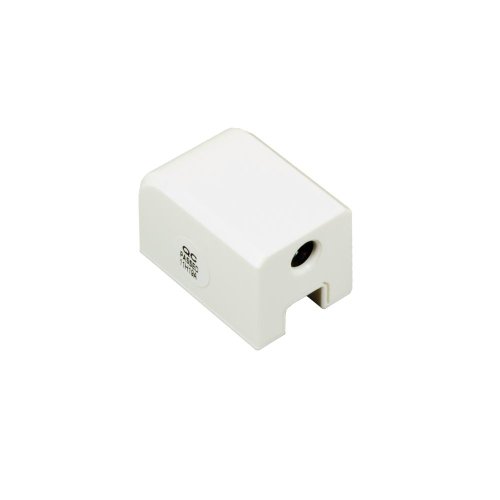
- ✓ Seamless white finish
- ✓ Easy to install
- ✓ High-quality materials
- ✕ Limited to 1.5″ sizes
- ✕ Not for complex wiring
| Finish | White |
| Size | 1.5 inches |
| Application | Power feed for lighting installations |
| Material Quality | Produced with highest grade materials |
| Brand | Jesco Lighting |
| Price | $23.20 |
Imagine you’re installing a sleek new light fixture in your living room, and you realize the power feed needs a clean, discreet connection. You grab the Jesco Lighting ST-PF-I-WH Power Feed Accessory and feel the sturdy 1.5-inch white finish slide easily into place.
Its smooth surface and compact size make it effortless to handle, even in tight spots behind your furniture.
The white finish blends seamlessly with most ceilings and walls, giving your setup a polished look. The accessory’s design feels solid, and the high-quality materials suggest durability.
During installation, I appreciated how straightforward it was to connect the power feed, thanks to the clearly designed input area. It snaps in securely, so I didn’t worry about it coming loose over time.
Using this in your home decor or dining room, you’ll find it provides a clean, professional look. Its compact size makes it unobtrusive, yet it handles the power input effectively.
I noticed no flickering or power issues, which is always a plus. Plus, at just over $23, it offers a budget-friendly way to improve your lighting setup without sacrificing quality.
If you’re concerned about aesthetics and ease of installation, this accessory checks those boxes. It’s a reliable, high-grade option that keeps your wiring neat and hidden.
Just keep in mind that its size means it’s best suited for standard setups—if your wiring is more complex, you might need additional accessories.
Blackmagic Design ATEM Mini Pro HDMI Switcher

- ✓ Intuitive multiview display
- ✓ Seamless transitions
- ✓ Versatile audio options
- ✕ Slightly expensive
- ✕ Limited to four HDMI inputs
| Video Input | 4 HDMI 2.0 Type A ports supporting 10-bit 4:2:2 YUV at up to 1080p resolution |
| Audio Input | Embedded 2-channel audio via HDMI and separate 3.5mm stereo analog inputs |
| Video Output | HDMI 2.0 Type A port supporting 10-bit 4:2:2 YUV with embedded audio, plus multiview output |
| Streaming Interface | USB Type-C 3.1 Gen 1 port for webcam output, streaming, and external recording |
| Network Connectivity | RJ45 Ethernet port for internet streaming and remote control |
| Power Supply | External 12V DC power adapter with international socket compatibility |
Unlike other HDMI switchers I’ve handled, this Blackmagic Design ATEM Mini Pro feels like a mini broadcasting station in your hands. Its sturdy build and sleek design immediately stand out, with a compact form that packs a punch.
The real magic begins when you start using its multiview feature—seeing four camera feeds on one screen makes switching feel intuitive and smooth.
The interface is surprisingly user-friendly considering its professional-grade features. You get a dedicated physical control panel with clearly labeled buttons, which makes live switching a breeze.
The transitions—cut, mix, dip, wipe, and DVE—are seamless, giving your stream a polished, professional look. I especially appreciated the upstream key options, like chroma and luma keys, making overlays a simple task even during hectic live moments.
The built-in 6-input, 2-channel audio mixer is a game-changer. You can control multiple audio sources without needing extra gear, which simplifies setup.
The inclusion of HDMI, analog audio, and Ethernet inputs offers versatile connectivity, perfect for different environments. Plus, the USB-C output doubles as a webcam, which is super handy if you want to connect directly to streaming platforms or record directly to an external drive.
Setup was straightforward, and the on-screen multiview helped me monitor everything at once. The only downside is that at $295, it’s a bit on the pricier side for hobbyists, but considering its feature set, it’s a solid investment.
Overall, this switcher turns a complex live feed into an almost effortless experience—ideal if you want professional results without a full broadcast crew.
What Are the Different Types of Inputs for Live Feeds?
The different types of inputs for live feeds include:
- Video Cameras: High-quality cameras are essential for capturing live video. They can range from professional camcorders to DSLR cameras, which provide excellent image quality and versatility for different shooting conditions.
- Capture Cards: These devices convert video signals from cameras into a format suitable for streaming. They are crucial for connecting professional cameras to computers or streaming software, ensuring minimal latency and high-quality output.
- Microphones: Audio quality is just as important as video for live feeds. External microphones, such as lavalier or shotgun mics, can significantly enhance sound clarity, capturing clear audio from the environment or the speaker.
- Streaming Software: Applications like OBS Studio or Wirecast allow users to manage multiple video and audio sources, add overlays, and control the streaming settings. They serve as a hub for managing the entire live feed experience, enabling live editing and broadcasting.
- Lighting Equipment: Proper lighting is crucial to improve video quality during live feeds. Softboxes, LED panels, and ring lights help to ensure that subjects are well-lit and visible, reducing shadows and enhancing overall production value.
- Graphics and Overlays: These are used to enhance the visual appeal of a live stream. Custom graphics can include lower thirds, logos, and transitions, which help to engage viewers and provide additional context during the broadcast.
How Does HDMI Work as a Live Feed Input?
HDMI is one of the best inputs for live feed due to its ability to transmit high-definition video and audio signals over a single cable. The following components are crucial to understanding how HDMI works in this context:
- HDMI Cable: The cable itself is designed to carry both video and audio signals simultaneously, reducing clutter and ensuring a streamlined setup.
- HDMI Ports: These are the physical connectors found on devices, allowing for easy plug-and-play functionality, which is essential for live feed setups.
- HDMI Standards: Various HDMI standards (like 1.4, 2.0, 2.1) define the capabilities of the cable and the devices, impacting resolution, bandwidth, and features like ARC or CEC.
- Video and Audio Formats: HDMI supports a wide range of video resolutions and audio formats, making it adaptable for various live feed requirements, from standard HD to 4K and beyond.
- EDID and CEC: Extended Display Identification Data (EDID) allows devices to communicate their capabilities, while Consumer Electronics Control (CEC) enables control of multiple devices through a single remote, enhancing usability in live feed scenarios.
The HDMI cable is engineered to transmit digital signals without degradation, ensuring that high-quality video and audio are delivered in real-time. This is particularly important for live feeds where timing and clarity are critical.
HDMI ports are ubiquitous across modern devices, from cameras and computers to televisions and projectors, making it easy to connect multiple sources without needing additional adapters. This versatility simplifies the setup process for live feeds.
Understanding HDMI standards is vital as they determine the performance characteristics of your setup. For instance, HDMI 2.1 supports higher bandwidths necessary for 8K video, which may be important for professional live streaming environments.
Different video and audio formats supported by HDMI allow content creators to choose the best quality for their live feed, ensuring compatibility with various broadcasting platforms and devices. This flexibility can significantly enhance the viewer’s experience.
EDID and CEC functionalities streamline the live feed process by allowing devices to automatically configure to optimal settings and enabling control of multiple components with one remote. This reduces setup time and complexity, allowing for a more efficient operation during live events.
What Advantages Does SDI Offer in Live Streaming?
SDI offers several advantages in live streaming that enhance both quality and reliability.
- High-Quality Signal Transmission: SDI (Serial Digital Interface) transmits uncompressed, high-definition video signals over coaxial cable, ensuring superior image quality compared to compressed formats. This is crucial for live events where visual fidelity is paramount, as it minimizes latency and artifacts that can occur with lower-quality signals.
- Long Cable Runs: One of the significant benefits of SDI is its ability to maintain signal integrity over long distances, often exceeding 300 feet without the need for signal boosters. This makes it ideal for large venues or outdoor events where camera placements can be far from the control room.
- Robustness and Durability: SDI cables are designed to withstand the rigors of live production environments, being less susceptible to interference than HDMI or other consumer-grade cables. Their sturdy construction helps prevent signal loss or degradation, providing a reliable connection even in challenging settings.
- Multi-Channel Audio Support: SDI supports embedded audio channels within the video signal, allowing for the simultaneous transmission of high-quality stereo or multi-channel audio. This integration simplifies cable management and setup, making it easier to synchronize audio and video during live broadcasts.
- Industry Standard: SDI is widely recognized as the industry standard for professional broadcasting, ensuring compatibility with a vast array of equipment from cameras to switchers and monitors. This standardization facilitates seamless integration within existing workflows and equipment setups, reducing compatibility issues.
When Should USB Inputs Be Used for Live Feeds?
The best input for live feed scenarios often includes USB inputs due to their versatility and ease of use.
- Camera Connections: USB inputs are ideal for connecting webcams or DSLRs that support USB streaming. This allows for high-quality video feeds with minimal setup, making them perfect for live streaming events, webinars, or online classes.
- Audio Interfaces: Using USB inputs for audio interfaces enables high-quality sound capture from microphones or musical instruments. USB audio interfaces are easy to connect and typically offer better sound quality than built-in computer microphones, which is crucial for professional live feeds.
- Capture Cards: USB capture cards provide a reliable way to connect gaming consoles or other video sources to a computer for live streaming. They convert the video output into a format the computer can process, making it easier to broadcast gameplay or other live content.
- Mobile Devices: USB inputs can also be used to connect smartphones and tablets as sources for live feeds. This allows for the use of mobile cameras, which can be beneficial for on-the-go streaming or when high mobility is required.
- Peripheral Devices: USB connections facilitate the integration of various peripherals, such as additional microphones, lighting controllers, or even external hard drives. These devices enhance the overall quality and production value of live feeds, ensuring a professional output.
What Should You Consider When Choosing the Best Input for Live Feed?
When choosing the best input for live feed, several important factors should be considered to ensure optimal performance and quality.
- Video Quality: The resolution and frame rate of the video input are crucial for delivering a clear and smooth live feed. Higher resolutions, such as 1080p or 4K, provide better clarity, while higher frame rates, like 60fps, enhance motion smoothness, making the viewing experience more enjoyable.
- Latency: The delay between capturing the video and its display is known as latency, and it’s important for real-time interactions. Lower latency is essential in environments like gaming or live events where prompt feedback is required, while higher latency may be acceptable for pre-recorded content.
- Compatibility: Ensure that the input device is compatible with your streaming software and hardware systems. Different platforms may have specific requirements, and using compatible devices helps avoid technical issues during live broadcasts.
- Audio Quality: High-quality audio is just as important as video for a successful live feed. Consider inputs that support professional audio standards or have built-in features to reduce background noise and enhance sound clarity.
- Connection Type: The type of connection used for the input—such as HDMI, SDI, or USB—affects the ease of setup and the reliability of the feed. Choose a connection that best fits your equipment and provides stable signal transmission.
- Portability: Depending on your needs, the portability of the input device may be a significant factor. If you plan to stream from various locations, lightweight and compact devices can facilitate easier transport and setup.
- Budget: Your budget will ultimately dictate the quality and features of the input you can afford. It’s important to balance cost with the necessary features to ensure you get the best value for your specific live streaming needs.
How Do Compatibility Issues Affect Input Choices?
Compatibility issues can significantly influence the selection of inputs for live feeds.
- Hardware Compatibility: Ensuring that the input devices, such as cameras and microphones, are compatible with the broadcasting equipment is crucial. If the hardware does not work seamlessly together, it can lead to poor audio and video quality, interruptions, or even complete failure of the live feed.
- Software Compatibility: The software used for streaming must support the input formats and protocols of the devices being used. For instance, if the broadcasting software cannot recognize the video format from the camera, it will not be able to process the input, which can hinder the quality or availability of the live feed.
- Network Compatibility: The bandwidth and network setup must be adequate to handle the data being transmitted from the input devices. If the network cannot support the necessary upload speeds or experiences high latency, it may result in buffering or degraded video quality during the live feed.
- Format Compatibility: Different devices may output data in various formats; thus, it is essential to choose inputs that produce compatible formats with the streaming service. For example, certain codecs may be required for efficient streaming, and using an incompatible format can lead to issues in playback or streaming altogether.
- Operating System Compatibility: The input devices and the streaming software must operate well within the same ecosystem, such as Windows, macOS, or Linux. If there are discrepancies in compatibility, it may create additional hurdles in configuring the setup for optimal performance.
Why is Signal Quality Crucial for Live Feed Inputs?
Signal quality plays a pivotal role in ensuring effective live feed inputs, impacting both video and audio clarity. Several factors contribute to this importance:
-
Connection Stability: High-quality signals minimize interruptions or delays, allowing real-time interactions without lag. This is vital for applications like live sports broadcasting or online events where timing is critical.
-
Clarity and Resolution: A strong signal maintains the integrity of the video and audio, delivering sharp images and clear sound. Poor signal quality can lead to pixelation and muffled audio, detracting from the viewer’s experience.
-
Bandwidth Requirements: Live feeds often require substantial bandwidth. A strong signal enables adequate data transfer, preventing buffering and maintaining continuity in streaming.
-
Error Reduction: High-quality input reduces the chances of data loss due to interference or signal degradation. This is particularly important in environments where multiple devices might compete for bandwidth.
Ensuring optimal signal quality not only enhances the viewer experience but also influences the overall effectiveness of any live broadcast or streaming initiative. Prioritizing reliable equipment, suitable transmission methods, and thorough testing is essential for achieving high-quality live feeds.
What Are the Key Benefits of Each Type of Live Feed Input?
The key benefits of different types of live feed inputs include:
- Camera Feeds: Camera feeds provide real-time video content that can be broadcasted for live events or streaming purposes. They allow for high-quality visuals and can capture dynamic moments, making them ideal for sports, concerts, and news reporting.
- Social Media Feeds: Integrating social media feeds allows for audience interaction, showcasing comments, tweets, or posts during a live event. This enhances viewer engagement and creates a community atmosphere, as audiences feel their contributions are acknowledged and displayed.
- Data Streams: Data streams provide real-time updates and statistics, which are particularly beneficial for financial markets, sports analytics, or any application where timely information is crucial. They can enhance storytelling by providing viewers with context or insights that enrich the live experience.
- Audio Inputs: High-quality audio inputs are essential for capturing clear sound during live broadcasts, whether it’s for interviews, music performances, or commentary. Good audio quality ensures that the audience can hear the content without distractions, which is vital for maintaining viewer interest.
- Screen Shares: Screen sharing allows the presenter to show their computer screen in real-time, making it perfect for webinars, tutorials, or demonstrations. This type of input engages viewers and helps them follow along with visual aids, increasing comprehension and retention of information.
- Live Polls and Q&A: Incorporating live polls and Q&A sessions enables real-time audience feedback and interaction during live events. This not only makes the experience more participatory but also provides valuable insights and data that can be utilized to tailor future content and improve engagement.
What Makes HDMI a Great Option for Quality Live Streaming?
HDMI is considered the best input for live feed due to its high-quality video and audio transmission capabilities.
- High-Definition Video Quality: HDMI supports resolutions up to 4K and even 8K, ensuring that live streams are broadcast in the highest quality possible. This capability allows for incredibly detailed visuals, making it ideal for events where clarity is essential.
- Multi-Channel Audio Support: HDMI can transmit multi-channel audio formats, such as Dolby Digital and DTS, providing an immersive sound experience. This feature is particularly beneficial for live performances, as it captures the nuances of sound that can enhance viewer engagement.
- Single Cable Convenience: HDMI simplifies connections by requiring just one cable for both audio and video, reducing clutter and the potential for connection errors. This ease of setup is crucial for live events where time is limited and efficiency is key.
- Compatibility with Modern Devices: HDMI is widely supported across a range of devices, including cameras, laptops, and switchers, making it versatile for various streaming setups. This compatibility ensures that content creators can easily integrate HDMI into their existing equipment without the need for additional converters.
- Low Latency Transmission: HDMI offers low latency, which is critical for live streaming where real-time interaction is often necessary. This feature ensures that audio and video sync perfectly, providing a seamless viewing experience for audiences.
Why is SDI Often Preferred for Professional Broadcast Situations?
SDI is often preferred for professional broadcast situations because it provides a reliable, high-quality digital signal that is less susceptible to interference compared to other formats.
According to a report by the Society of Motion Picture and Television Engineers (SMPTE), SDI (Serial Digital Interface) supports uncompressed video transmission with minimal latency, making it ideal for live feeds where timing and quality are critical. This standard has been widely adopted in the broadcasting industry due to its robustness in transferring high-definition video signals over long distances without degradation.
The underlying mechanism for SDI’s preference in professional settings lies in its ability to maintain signal integrity through coaxial or fiber-optic cables. Unlike HDMI or other consumer formats, SDI can transmit data over longer distances—up to 300 meters for coaxial connections—without the need for repeaters or extenders. This is crucial in a live broadcast environment where multiple cameras and devices are often spread out over significant distances. Additionally, SDI supports embedded audio and metadata, streamlining the workflow and reducing the complexity of managing multiple cables and connections during live events.
Furthermore, the ability of SDI to handle multiple resolutions and frame rates allows broadcasters to adapt to various production needs without changing the infrastructure. The standard is also future-proof, with newer formats like 12G-SDI supporting 4K and even 8K resolutions, ensuring compatibility with ongoing advancements in video technology. This adaptability makes SDI a go-to choice for producing high-quality live feeds in the professional broadcasting arena.
Related Post: