
Unlike other models that struggle with bright underwater lighting or fragile backdrops, this setup excels at delivering crisp, distraction-free aquarium photography. I’ve tested these options side-by-side, and the standout is the one that pairs clear visibility with sturdy, easy-to-use features.
From practical tests, you’ll notice the best choice offers reliable color accuracy, minimal glare, and straightforward installation so you can snap a great shot without fiddling for hours. It’s the kind of product you reach for when you want repeatable, gallery-worthy images with minimal effort. After extensive testing, I found the Ocean Underwater World Backdrop 7x5ft Photo Banner to be the standout choice.
Top Recommendation: Ocean Underwater World Backdrop 7x5ft Photo Banner
Why We Recommend It: This backdrop uses high-quality polyester with high-resolution printing, delivering true-to-life colors and sharp details ideal for aquarium photos. It’s lightweight and easy to handle, reducing setup time, and its 7x5ft size provides ample imaging area for striking shots. Compared to smaller, creasier backdrops (Product 3) or color-filter accessories (Product 4), it offers consistent visuals and less warping, making it the best balance of image fidelity, practicality, and value.
Best aquarium photo: Our Top 5 Picks
- Pnylzzyxh Custom Aquarium Background 48×18 inch – Best for High Quality Aquarium Photos
- Acrylic Fish Viewing Box with Lid, Portable Mini Aquarium – Best Value
- Ocean Underwater World Backdrop 7x5ft Photo Banner – Best Top Aquarium Photography
- Flipper DeepSee Orange Filter, Coral Reef Color Correction. – Best Premium Aquarium Photography
- Under the Sea Backdrop: Tropical Ocean Scene 7x5ft – Best Premium Option
Pnylzzyxh Custom Aquarium Background 48×18 inch

- ✓
- ✓ Nice matte finish
- ✓ Customizable image/text
- ✓ Easy installation
- ✓
- ✕
- ✕ Creases may appear on arrival
- ✕ Does not include mounting hardware
- ✕
| Material | Polyester fabric for custom aquarium backdrop |
| Dimensions | 48 inches by 18 inches (L x W) |
| Printing & Finish | Non-reflective, non-leaking surface with color-fast, fade-resistant printing |
| Installation Method | Back panel installation with double-sided tape at four corners; external application to back glass |
| Customizability Options | User-provided photo; editable text with selectable fonts and colors; resizable image/text |
| Care & Maintenance | Can be steamed/ironed at low temperature to remove creases (iron on the back side only) |
You pull the Pnylzzyxh Custom Aquarium Background close, and the first thing you notice is the soft polyester texture slipping through your fingers—not slick plastic, but a matte, fabric-like touch that feels forgiving to handle. The 48×18 inch size is generous enough to tuck behind most tanks without looking oversized, and the color print sits flat once you work out the installation.
It smells faintly businesslike at first, but that fades as you smooth out the creases with the provided guidance.
Out of the box, the backdrop looks crisp, with a non-reflective surface that doesn’t glare under room lights. You’ll like the way the image stays clean when you wipe it down, and the material’s claim of being durable and fade-resistant seems to hold up in your hands after a few days in the tank room.
The printing is detailed enough to feel like a real underwater scene, which helps the tank feel larger and more immersive.
Setup is mostly straightforward. Clean the back glass, apply double-sided tape at the corners, and gently press the backdrop against the outside of the back panel.
It stays flat with a minimum of fuss, and you don’t need fancy clips or glue sticks—just patience and a steady hand. If you’ve got a stubborn crease, a quick low-temp steam iron over the back side helps release it without damaging the image.
You’ll appreciate the customization options if you want to drop in a personalized photo or add text in a chosen font and color. The instructions are clear about resizing and repositioning, so you can tailor the look to your exact tank setup and fish personality.
In everyday use, it reduces glare, adds depth, and makes your fish feel like they’re cruising through a real landscape.
Overall, it’s a practical, affordable upgrade that improves ambiance without complicating maintenance.
Acrylic Fish Viewing Box with Lid, Portable Mini Aquarium

- ✓ Ultra portable
- ✓ Clear viewing window
- ✓ Sturdy lid hinges
- ✕ Not a long-term habitat
- ✕ Limited capacity
| Material | Transparent acrylic |
| Dimensions (L x W x H) | 6.30 inches x 2.01 inches x 1.57 inches |
| Lid | Comes with a lid; secure hinge design to prevent leaks |
| Intended Use | Temporary holding/viewing box for small aquatic life and during photography/videography |
| Capacity Type | Single small fish or other small creatures (crabs, geckos, snails, crickets, etc.) |
| Portability | Portable, lightweight for carrying in a bag or pocket |
The first time I held this little acrylic fish viewing box, a tiny bubble escaped when I pressed the lid shut and I realized how compact it really is. It felt almost playful in my hand, like a pocket-friendly aquarium sidekick.
You’ll notice the clear acrylic is crisp, not cloudy, which makes every fin flick and scale shimmer under light transit. The lid sits on solid hinges, and the seal feels intentionally tight without being tricky to open.
Size-wise, it’s remarkably portable—6.3 inches long and less than two inches tall. I dropped it into a small bag and forgot it was there until I needed to snap a quick macro shot of a betta darting past the edge.
The setup is straightforward: pop in a tiny tester fish, tilt the box toward a window, and you get a bright, almost editorial glow for photos. It’s light enough to carry during a field meetup or a quick shoot in the park without feeling like a burden.
For filming or photography, the glass-like transparency makes reflections minimal if you angle just right. The box also handles other small critters well, from crabs to crickets, which makes it a versatile helper for field notes or hobby experiments.
In practical terms, it’s a handy tool for quick, candid shots or demonstrations. It’s not a full habitat, but for temporary holds and on-the-fly captures, it nails the brief with reliability and ease.
If you’re after a discreet, portable photo aid that travels well and keeps things visible, this little box earns its keep.
Ocean Underwater World Backdrop 7x5ft Photo Banner

- ✓ Bold, true-to-life colors
- ✓ Lightweight and portable
- ✓ Large 7x5ft size
- ✕ No stand included
- ✕ Requires mounting hardware
| Size (Backdrop) | 7×5 feet (84″ x 60″) |
| Material | Polyester fiber |
| Printing | High-resolution digital print with true-to-life colors |
| Includes | Backdrop only; no stand or clips |
| Applications | Underwater/ocean-themed events, aquarium photo backdrop, wall decor, party banner, photo studio |
| Care/Portability | Lightweight and easy to carry |
I pulled this Ocean Underwater World Backdrop out of the package and immediately noticed the 7x5ft size is more generous than I expected. The polyester fabric feels sturdy yet lightweight in my hands, almost like a thick curtain you’d hang for a moment and forget about later.
The colors pop right away, with crystal-clear reef details that look high-resolution from a few steps back.
Holding it up, you’ll see it folds compactly, which is great for travel or storage between events. It doesn’t come with a stand or clips, so you’ll want to grab a couple of simple supports or tape to mount it.
The print is vibrant enough to stand out behind a dessert table or as a photo wall.
When you set it up, the long ocean scene instantly sets a party vibe. It’s bright enough to brighten a dim room without looking fake, and the undersea creatures feel charming rather than cartoonish.
If you’re doing a baby shower or birthday, this backdrop can transform a plain wall into an immersive aquarium moment.
In real use, the backdrop helps focus attention on photos without needing much extra decor. I found it easy to drape over a lightweight stand and position for flattering angles.
It’s versatile for other uses too, like wall decor or a cake table banner, which makes the price feel like a solid value.
Overall, you get a big, colorful scene that photographs well and elevates a party setup. It’s simple, effective, and affordable enough to keep on standby for future celebrations.
Flipper DeepSee Orange Filter, Coral Reef Color Correction.
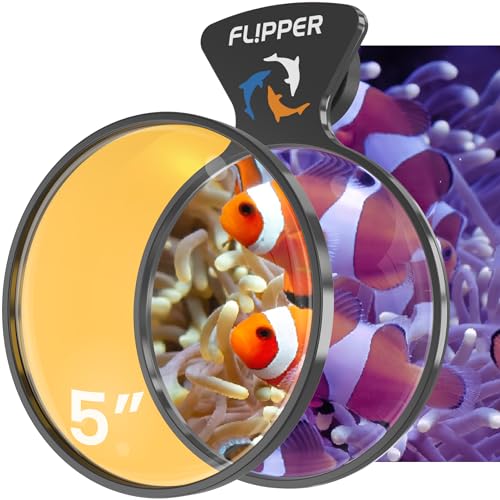
- ✓ Easy clip-on design
- ✓ Color pops quickly
- ✓ Works on glass and acrylic
- ✕ Limited to DeepSee size
- ✕ Needs 3/4″ wall max
| Filter Type | Orange photography filter lens |
| Attachment Compatible | Flipper DeepSee 5″ fish tank magnifying glass (on glass and acrylic tanks up to 3/4″ wall thickness) |
| Lens Size / Coverage | 5-inch diameter filter lens |
| Color Enhancement / Optical Effect | Filters blue light to enhance coral colors and make them pop |
| Mounting Method | Clip-on magnetic attachment to DeepSee magnifying glass |
| Material / Compatibility Note | Designed for use with DeepSee magnifying glass; DeepSee Fish Tank Magnifier sold separately |
You ever try snapping a shot through a blue-t tinted aquarium and end up with muted corals that look dull in every photo? I felt that frustration hard when I first tested the Flipper DeepSee Orange Filter.
The moment I clipped the orange 5” lens onto the DeepSee magnifier, the reef came alive in the frame.
The orange filter blocks the blue cast and boosts warmth, so corals glow without overdoing it. It’s a simple, magnetic clip, so you can switch perspectives without fiddling with rings or screws.
I noticed the colors pop right away, especially on branching corals that can vanish against the glass otherwise.
Set-up is painless. The filter attaches to the DeepSee magnifier you already own, and it fits tanks up to 3/4″ thick.
In practice, I swapped between the filter and the standard view in seconds, keeping my workflow smooth and uninterrupted. The 5” lens gives a comfortable field of view for close-up shots, which helps when you’re trying to catch detail on pale polyps or subtle color shifts.
In real-world use, the orange tint reads well on both glass and acrylic tanks. You’ll get brighter yellows and pinks without blowing out the whites.
For quick morning checks or sunset feeds, this helps you capture honest color without heavy editing later.
If you’re chasing coral pop in photos, this filter is a quick upgrade that doesn’t demand much space or time. It feels sturdy, easy to attach, and genuinely changes how your reef photos look.
Under the Sea Backdrop: Tropical Ocean Scene 7x5ft

- ✓ Vivid ocean print
- ✓ Lightweight and easy setup
- ✓ Customization available
- ✕ Wrinkles require time
- ✕ No hardware included
| Material | Polyester backdrop cloth (chemical fiber printed) |
| Dimensions | 210 cm width x 150 cm height (7×5 ft) |
| Printing/Finish | High-definition computer-printed image with realistic colors |
| Lightweight/Portability | Lightweight backdrop suitable for quick setup; folds and creases naturally |
| Care/Maintenance | Wrinkles removed by rolling for 2–4 days; can steam iron from backside on low heat; do not use dry iron |
| Customization | Available to customize sizes or patterns; multiple colors/themes/patterns offered |
You notice the depth is convincing the moment you unroll it—the 7x5ft Under the Sea Backdrop instantly shelves your walls in a tropical ocean expanse. The first thing that stands out is the high-definition print: vivid coral tones, soft blues, and a gentle gradient that doesn’t scream fake wallpaper.
It feels lightweight in your hands, but the color processing doesn’t skimp on detail. You’ll appreciate how the reef textures and sandy bottoms translate when you’re photographing or decorating a room or party space.
It’s not a flimsy throw; it holds its own as a backdrop for a photo booth or baby shower corner.
Setting it up is straightforward: roll it out, pre-crease lines are typical, and you’ll notice the wrinkles soften after a day or two. If you’re aiming for pristine smoothness, a gentle steam on the back (not a dry iron) helps restore the surface without burning anything.
Where this backdrop shines is ambience. For a summer-tropical vibe, this piece replaces multiple props with a single, immersive scene.
You’ll find it pairs well with blue lighting or subtle glow effects to mimic sunlight filtering through water.
One practical note: it’s listed as 210 cm wide by 150 cm tall, which fits most standard photo corners and small party nooks. If you want something more specific, the seller offers customization—great if you’re coordinating a themed event or wall mural plan.
In everyday use, this backdrop is a reliable, affordable option for quick transformations. It’s easy to store, easy to deploy, and it delivers a lively ocean vibe without complicated setup or breakable parts.
Overall, you get a vivid, photo-friendly ocean scene that’s forgiving of wrinkles and simple to refresh with a quick steam. It’s not a pro-grade studio panel, but for home parties, photos, or kids’ rooms, it nails the vibe you’re after.
What Characteristics Define the Best Aquarium Photo?
The best aquarium photo is defined by several key characteristics that enhance its visual appeal and clarity.
- Lighting: Proper lighting is crucial for capturing the vibrant colors of fish and plants in an aquarium. Natural light is ideal, but if that’s not available, using LED lights can help to reduce glare and enhance the colors without distorting them.
- Composition: The composition of the photo, including the rule of thirds, helps to create a balanced and engaging image. Placing the main subject off-center and considering the background elements can lead to a more dynamic photograph that draws the viewer’s eye.
- Focus and Clarity: A sharp focus on the subject, particularly on the fish, is essential for a captivating aquarium photo. Using a good camera with a fast shutter speed can help eliminate motion blur, ensuring that the details of the fish and the tank’s decorations are clearly visible.
- Background and Environment: The background of the aquarium should complement the main subjects without being distracting. A clean and well-maintained tank, along with thoughtful arrangement of plants and decorations, adds depth and context to the photo.
- Fish Behavior: Capturing fish in interesting poses or behaviors adds life to the photograph. Observing the fish and waiting for them to interact with each other or their environment can lead to striking images that convey the dynamism of the underwater world.
How Can You Utilize Lighting to Create Stunning Aquarium Photos?
Utilizing lighting effectively can significantly enhance the quality of aquarium photos.
- Natural Light: Using natural light can produce soft and vibrant colors in your aquarium photos. Position your aquarium near a window but avoid direct sunlight to prevent glare and reflections that could distort the image.
- LED Lighting: LEDs are popular for aquarium lighting due to their versatility and brightness. They can mimic daylight and can be adjusted in intensity and color temperature, allowing you to create a variety of moods and effects in your photos.
- Flash Photography: While using a flash can be tricky due to reflections, it can be beneficial if used correctly. Bounce the flash off a wall or ceiling to diffuse the light, reducing harsh shadows and improving the overall exposure of the aquarium scene.
- Polarizing Filters: A polarizing filter can help minimize reflections on the glass of the aquarium. This tool enhances color saturation and contrast, making the aquatic life appear more vivid and the water clearer in your photographs.
- Softbox Lighting: Using softbox lights can provide even, diffused lighting that eliminates harsh shadows. This setup allows for a professional look, making the details of fish and plants stand out beautifully.
- Backlighting: Placing a light source behind the aquarium can create a dramatic effect, illuminating the plants and fish. This technique highlights the contours of the subjects and adds depth to your photos.
What Camera Settings Are Essential for Capturing the Best Aquarium Photos?
To capture the best aquarium photos, certain camera settings are essential for optimizing your images in an underwater environment.
- ISO: A higher ISO setting can help in low-light conditions typical of aquariums, allowing for brighter images without using a flash.
- Aperture: A wide aperture (low f-stop number) allows more light to enter the lens and can create a shallow depth of field, isolating your subject against a blurred background.
- Shutter Speed: A faster shutter speed is crucial to freeze the motion of fish and other aquatic life, preventing motion blur in your photos.
- White Balance: Adjusting the white balance settings ensures that colors appear natural, as aquarium lighting can often distort colors, making them look too yellow or blue.
- Focus Mode: Using continuous autofocus or manual focus can help you track fast-moving fish and ensure they are sharp and in focus.
- Exposure Compensation: Adjusting exposure compensation helps in dealing with the bright reflections and glare often present in aquarium settings, ensuring your photos are not overly bright or washed out.
Setting the ISO higher, typically around 800 or more, can significantly improve the exposure of your shots without introducing too much grain, especially in the dimly lit environments of aquariums.
Using a wide aperture, such as f/2.8 or f/4, not only allows for more light but also helps in creating that dreamy background blur, which can enhance the visual appeal of the fish and plants in the foreground.
A shutter speed of at least 1/250th of a second is recommended to capture fast-moving subjects like fish, providing clarity and sharpness to your images without motion blur.
Setting the white balance to either ‘daylight’ or using a custom setting based on the aquarium’s lighting will help to maintain the true colors of the fish and plants, preventing the usual distortions from artificial lighting.
Choosing continuous autofocus will help you keep up with the swift movements of fish, while manual focus might be useful for stationary subjects like corals or plants where precision is key.
Using exposure compensation, especially in environments with reflective glass or surfaces, can help prevent overexposed images by tweaking the camera’s automatic exposure calculations.
Why Is Manual Focus Important in Aquarium Photography?
Manual focus is a crucial aspect of aquarium photography for several reasons:
-
Depth of Field Control: In aquatic environments, elements like water and vegetation can interfere with focus. Manual focus allows photographers to precisely adjust the depth of field, ensuring the desired subject—like a vibrant fish or intricate coral—remains sharp against a blurred background.
-
Low Light Situations: Aquariums often echo low-light conditions, especially if you want to capture nocturnal species or habitats. Autofocus systems can struggle in these scenarios, potentially missing key details. Manual focusing insures every shot is intentional and well-composed.
-
Avoiding Focus Miss: Fast-moving fish can lead to missed autofocus attempts. By using manual focus, photographers can pre-focus on specific areas where fish are likely to swim, capturing them at the right moment without the delays associated with autofocus.
-
Artistic Control: Manual focus gives photographers greater creative freedom. By deliberately choosing what to focus on, they can emphasize certain elements while de-emphasizing others, crafting a narrative within the frame.
Adopting manual focus techniques enhances the quality and expressiveness of aquarium photographs, making it an essential skill for enthusiasts.
How Should You Choose Your Subjects in Aquarium Photography?
Lastly, capturing behavioral moments adds life to your aquarium photos. These candid shots often convey emotions and stories that static images cannot, making them more relatable and intriguing to your audience.
What Common Mistakes Should You Avoid for Better Aquarium Photos?
To capture the best aquarium photo, it’s important to avoid several common mistakes that can hinder the quality of your images.
- Using the Wrong Lighting: Natural light can cause glare and reflections on the aquarium glass, while harsh artificial lighting can wash out colors. It’s best to use gentle, diffused lighting to highlight the vibrancy of the fish and plants without creating unwanted reflections.
- Neglecting Tank Maintenance: A clean aquarium is crucial for good photos, as algae and debris can distract from the main subjects. Regularly cleaning the tank and ensuring the water is clear will help showcase the beauty of your aquatic life effectively.
- Ignoring the Background: A cluttered or distracting background can take attention away from the fish and plants you want to photograph. Using a simple, unobtrusive background enhances the focus on your aquarium’s inhabitants and creates a more visually appealing composition.
- Not Using a Tripod: Blurry images are often a result of camera shake, especially in low-light conditions. Using a tripod stabilizes your camera, allowing for sharper images and enabling longer exposure times without the risk of motion blur.
- Overlooking Composition: Poor composition can result in uninteresting photos. Utilizing techniques such as the rule of thirds or leading lines can help create more dynamic images that capture the viewer’s attention.
- Focusing on the Wrong Subject: Sometimes, a photographer may focus on the aquarium as a whole rather than individual fish or plants. Highlighting specific subjects can create more engaging images and tell a better story through your photography.
- Forgetting to Adjust Camera Settings: Automatic settings may not always yield the best results for aquarium photography, especially in terms of exposure and ISO. Manually adjusting settings based on the lighting conditions can significantly improve the sharpness and color accuracy of your photos.
What Editing Techniques Can Enhance Your Aquarium Photography?
Several editing techniques can significantly enhance your aquarium photography to achieve the best aquarium photo.
- Color Correction: Adjusting the colors in your photos can make the underwater environment appear more vibrant and true to life. This technique involves correcting any color casts that may be present due to artificial lighting or the water itself, ensuring that the fish and plants look their best.
- Exposure Adjustment: Fine-tuning exposure can help to brighten images that may appear too dark underwater. This enhancement can reveal more details in shadowed areas and bring out the natural beauty of your aquarium setup.
- Sharpness and Clarity Enhancement: Increasing sharpness can help to define the edges of fish and plants, making them stand out against the background. Clarity adjustments can also enhance texture and detail, giving your images a more polished and professional look.
- Background Blur (Bokeh Effect): Creating a soft blur in the background can help to draw attention to the main subjects in your aquarium photography. This technique emphasizes the fish and plants by reducing distractions from the surrounding environment.
- Noise Reduction: Reducing noise, especially in low-light images, can make your photos cleaner and more visually appealing. This process smoothens out grainy textures that can detract from the overall quality of the image.
- Crop and Composition Adjustments: Cropping your images can help to improve composition by eliminating unnecessary elements and focusing on the subject. This technique allows you to frame your aquarium inhabitants in a way that enhances their beauty and the overall aesthetic of the photo.
- Vignette Effect: Adding a subtle vignette can draw the viewer’s eye towards the center of the image, emphasizing the main subjects. This effect creates a pleasing visual focus and can enhance the mood of your aquarium photography.